

How to prevent a rootkit attack
Gilad Maayan
Gilad Maayan
If you’re ever at the receiving end of a rootkit attack, then you’ll understand why they are considered one of the most dangerous cyberthreats today.
Rootkits are a type of malware designed to stay undetected on your computer. Cybercriminals use rootkits to remotely access and control your machine, burrowing deep into the system like a latched-on tick. Rootkits typically infect computers via phishing email, fooling users with a legitimate-looking email that actually contains malware, but sometimes they can be delivered through exploit kits.
This article provides an overview of the different types of rootkits and explains how you can prevent them from infecting your computer.
What is a rootkit?
A rootkit is a type of malicious software that provides root-level, privileged access to a computer while hiding its existence and actions. Hackers use rootkits to conceal themselves until they decide to execute their malicious malware.
In addition, rootkits can deactivate anti-malware and antivirus software, and badly damage user-mode applications. Attackers can also use rootkits to spy on user behavior, launch DDoS attacks, escalate privileges, and steal sensitive data.
Possible outcomes of a rootkit attack
Today, malware authors can easily purchase rootkits on the dark web and use them in their attacks. The list below explores some of the possible consequences of a rootkit attack.
- Sensitive data stolen: Rootkits enable hackers to install additional malicious software that steals sensitive information, like credit card numbers, social security numbers, and user passwords, without being detected.
- Malware infection: Attackers use rootkits to install malware on computers and systems without being detected. Rootkits conceal the malicious software from any existing anti-malware or antivirus, often de-activating security software without user knowledge. As a result of deactivated anti-malware and antivirus software, rootkits enable attackers to execute harmful files on infected computers.
- File removal: Rootkits grant access to all operating system files and commands. Attackers using rootkits can easily delete Linux or Windows directories, registry keys, and files.
- Eavesdropping: Cybercriminals leverage rootkits to exploit unsecured networks and intercept personal user information and communications, such as emails and messages exchanged via chat.
- Remote control: Hackers use rootkits to remotely access and change system configurations. Then hackers can change the open TCP ports inside firewalls or change system startup scripts.
Types of rootkit attacks
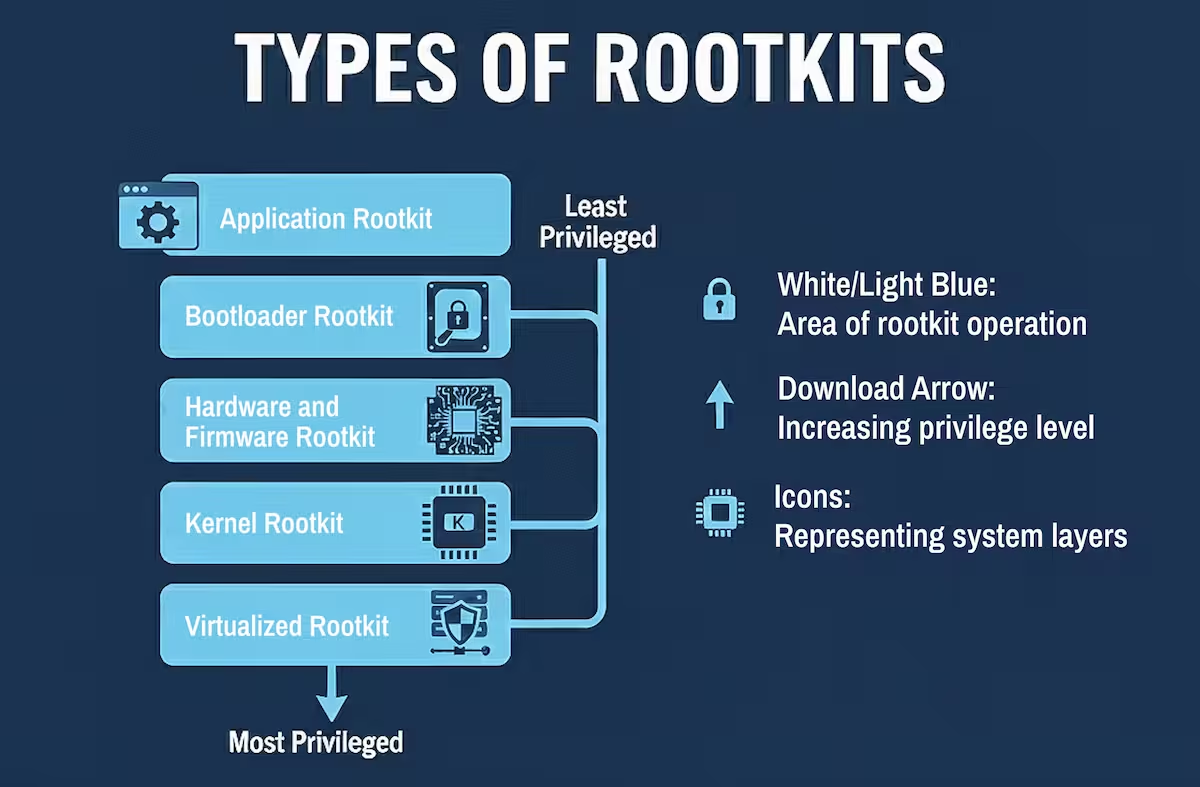
Attackers can install different rootkit types on any system. Below, you’ll find a review of the most common rootkit attacks.
- Application rootkits
Application rootkits replace legitimate files with infected rootkit files on your computer. These rootkits infect standard programs like Microsoft Office, Notepad, or Paint. Attackers can get access to your computer every time you run those programs. Antivirus programs can easily detect them since they both operate on the application layer. - Bootloader rootkits
The bootloader mechanism is responsible for loading the operating system on a computer. These rootkits replace the original bootloader with an infected one. This means that bootloader rootkits are active even before the operating system is fully loaded. - Hardware and firmware rootkits
This kind of rootkit can get access to a computer’s BIOS system or hard drives as well as routers, memory chips, and network cards. - Kernel rootkits
Attackers use these rootkits to change the functionality of an operating system by inserting malicious code into it. This gives them the opportunity to easily steal personal information. - Virtualized rootkits
Virtualized rootkits take advantage of virtual machines in order to control operating systems. They were developed by security researchers in 2006 as a proof of concept.
These rootkits create a virtual machine before the operating system loads, and then simply take over control of your computer. Virtualized rootkits operate at a higher level than operating systems, which makes them almost undetectable.
How does a rootkit attack work?
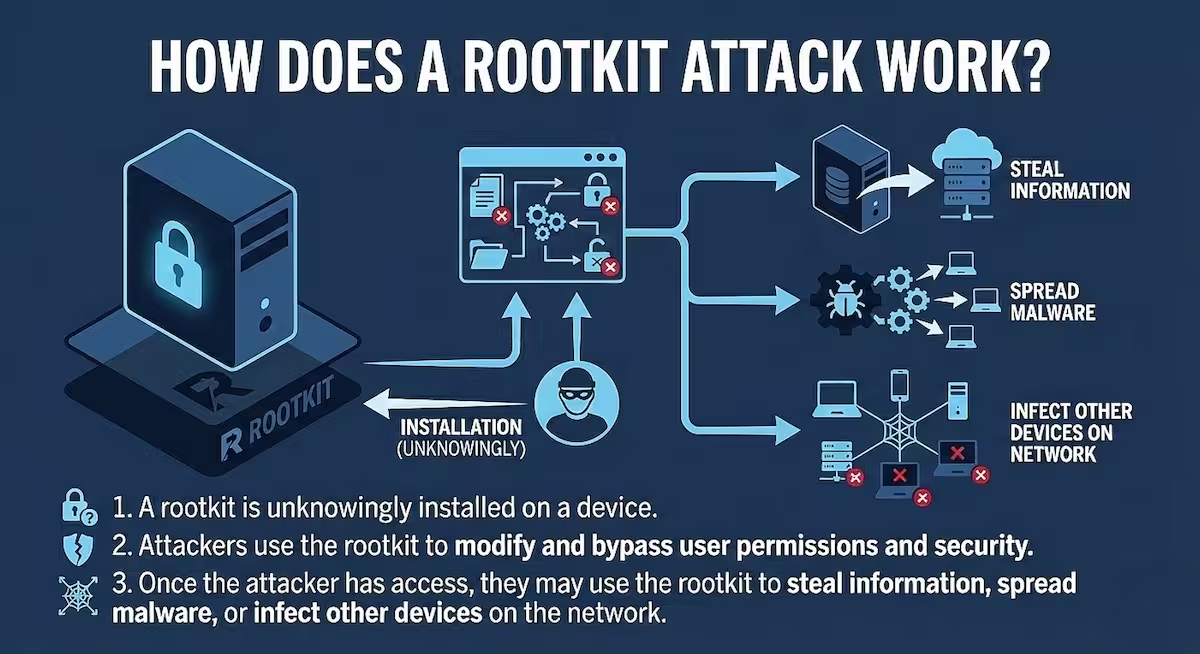
In order to prevent a rootkit attack from disrupting your organization, you first need to understand how it works. Here is how a typical rootkit attack unfolds:
- Initial access
The attacker first needs to gain access to the target system. This can happen through:- Phishing emails with malicious attachments
- Drive-by downloads from compromised websites
- Exploiting unpatched vulnerabilities
- Social engineering to trick users into installing malware
- Privilege escalation
Once they have basic access, attackers typically need to escalate privileges to gain administrative/root access, which allows them to:- Install the rootkit components
- Modify system files
- Bypass security controls
- Rootkit installation
With elevated privileges, the attacker installs the rootkit, which may target different levels of the system:- User-mode rootkits: Manipulate application-level files and APIs
- Kernel-mode rootkits: Modify the operating system kernel itself
- Bootkit rootkits: Infect the master boot record or boot loader
- Firmware rootkits: Target device firmware like UEFI/BIOS
- Library-level rootkits: Target shared libraries/DLLs
- Concealment mechanisms
The key feature of rootkits is their ability to hide themselves using techniques such as:- Hooking system calls to intercept and modify responses
- Hiding files, processes, network connections, and registry entries
- Manipulating system monitoring tools to avoid detection
- Using code injection techniques (f.e. process hollowing) to embed malicious code within legitimate processes
- Persistence establishment
Rootkits create persistence mechanisms to survive reboots:- Modified startup files or registry entries
- Infected boot sectors
- Altered system services or daemons
- Hidden scheduled tasks
- Malicious activities
Once established, rootkits enable attackers to:- Maintain backdoor access to the system
- Steal sensitive information and credentials
- Monitor user activity (keylogging, screenshots)
- Use the compromised machine in botnets
- Launch additional attacks from the compromised system
- Command and control
Sophisticated rootkits establish communication with command and control servers, allowing attackers to:- Issue new commands
- Update rootkit functionality
- Exfiltrate stolen data
- Coordinate with other compromised systems
Understanding these steps helps in implementing proper prevention measures like keeping systems patched, using reputable security software, employing privilege separation, and implementing robust monitoring solutions.
How to prevent a rootkit attack
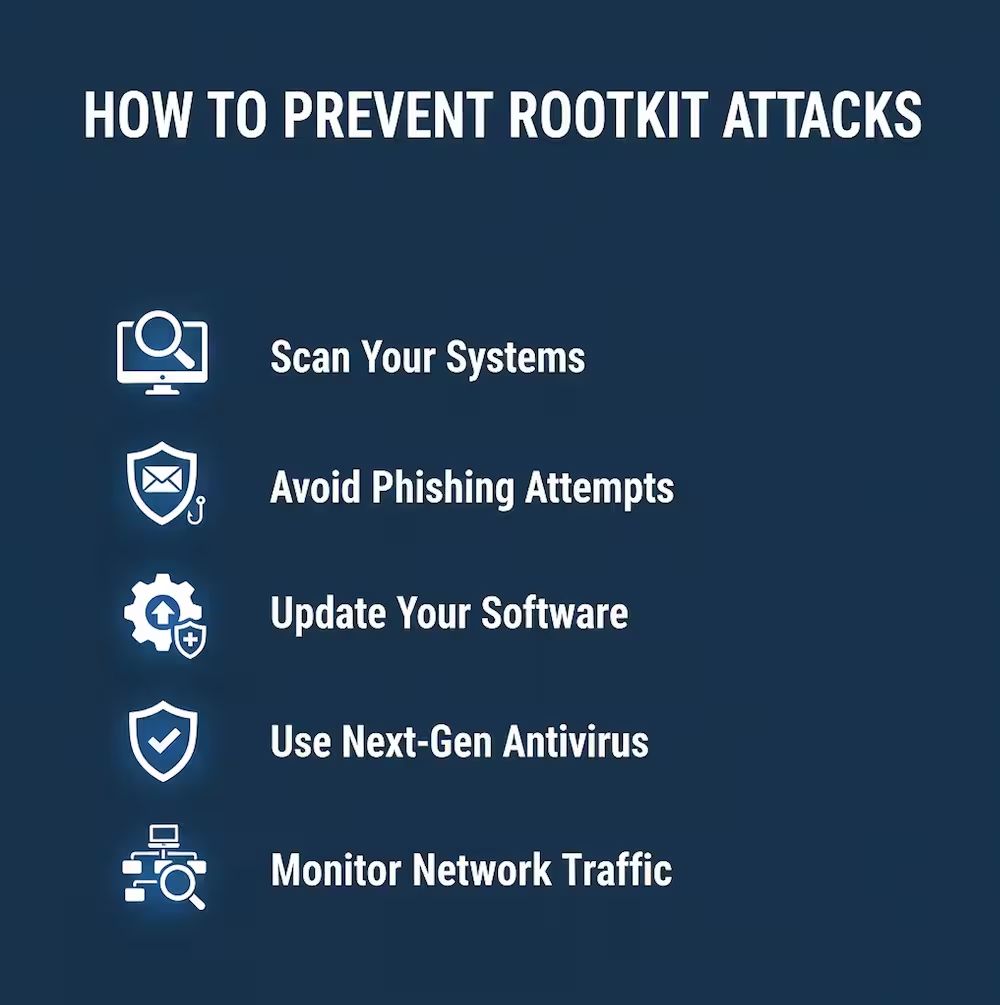
Rootkit attacks are dangerous and harmful, but they only infect your computer if you somehow launched the malicious software that carries the rootkit. The tips below outline the basic steps you should follow to prevent rootkit infection.
- Scan your systems
Scanners are software programs aimed to analyze a system to get rid of active rootkits.
Rootkit scanners are usually effective in detecting and removing application rootkits. However, they are ineffective against kernel, bootloader, or firmware attacks. Kernel level scanners can only detect malicious code when the rootkit is inactive. This means that you have to stop all system processes and boot the computer in safe mode in order to effectively scan the system.
Security experts claim that a single scanner cannot guarantee the complete security of a system, due to these limitations. Therefore, many advise using multiple scanners and rootkit removers. To fully protect yourself against rootkits attacks at the boot or firmware level, you need to backup your data, then reinstall the entire system. - Avoid phishing attempts
Phishing is a type of social engineering attack in which hackers use email to deceive users into clicking on a malicious link or downloading an infected attachment.
The fraudulent email can be anything, from Nigerian prince scams asking to reclaim gold to fake messages from Facebook requesting that you update your login credentials. The infected attachments can be Excel or Word documents, a regular executable program, or an infected image. - Update your software
Many software programs contain vulnerabilities and bugs that allow cybercriminals to exploit them—especially older, legacy software. Usually, companies release regular updates to fix these bugs and vulnerabilities. But not all vulnerabilities are made public. And once software has reached a certain age, companies stop supporting them with updates.
Ongoing software updates are essential for staying safe and preventing hackers from infecting you with malware. Keep all programs and your operating system up-to-date, and you can avoid rootkit attacks that take advantage of vulnerabilities. - Use next-gen antivirus
Malware authors always try to stay one step ahead of the cybersecurity industry. To counter their progress, you should use next-gen antivirus technology that leverages modern security techniques, like machine learning-based anomaly detection and behavioral heuristics. This type of antivirus can determine the origin of the rootkit based on its behavior, detect the malware, and block it from infecting your system. - Monitor network traffic
Network traffic monitoring techniques analyze network packets in order to identify potentially malicious network traffic. Network analytics can also mitigate threats more quickly while isolating the network segments that are under attack to prevent the attack from spreading.
Rootkit prevention beats clean-up
A rootkit is one of the most difficult types of malware to find and remove. Attackers frequently use them to remotely control your computer, eavesdrop on your network communication, or execute botnet attacks.
This is a nasty type of malware that can seriously affect your computer’s performance and lead to personal data theft. Since it’s difficult to detect a rootkit attack, prevention is often the best defense. Use the tips offered in this article as a starting point for your defense strategy. To ensure continual protection, continue learning. Attacks always change, and it’s important to keep up.
See what threats we’re anticipating
Our State of Malware Report reveals what to expect in the days ahead. Download your free copy to stay informed.
Editor’s Note: This post was originally published in January 2020 and has been updated for accuracy and comprehensiveness.



Sign up to get the latest threat intelligence.
Subscribe to newsletter