
176.65.139.61
ThreatDown is now the name of the Malwarebytes line of business products. References to Malwarebytes below reflect the amazing technology used to first identify the threat.
Short bio
The IP address 176.65.139.61 was blocked by Malwarebytes because it is associated with a Trojan.
Malicious behavior
Servers at this IP address were found to be associated with a Mirai botnet.
A Mirai botnet is a type of malware that infects IoT devices (like security cameras, routers, and DVRs) by exploiting weak passwords, and known vulnerabilities to launch distributed denial-of-service (DDoS) attacks that can overwhelm and crash websites and online services.
Protection
Malwarebytes blocks the IP address 176.65.139.61 because it is associated with a Trojan.
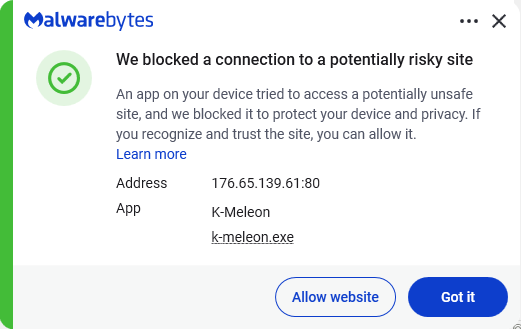
Add an exclusion
Should users wish to visit a blocked IP Address and exclude it from being blocked, they can add it to the exclusions list. Here’s how to do it.
- Open Malwarebytes for Windows.
- To add an item to the Allow List, click Add item.
- Select Select website.
- Select Add an IP address and enter the IP address that you wish to exclude.
- Click on Save and the IP address should appear in your Allow List.
You can also remove exclusions here when they are no longer needed.